
Guides · Features
Sleep Timer
Stop playback at the end of the chapter or after a set time, with a fade out, a night window that arms it for you, and a countdown on the lock screen
Falling asleep to a book is the point of a sleep timer, and losing your place is what makes people stop using one. SoundLeaf’s fades out rather than stopping dead, resumes from where the fade began, and can arm itself at the hours you actually go to bed.
Setting a timer
Open the player and tap the moon button in the row of actions. Books and podcast episodes both have it.
- Presets: 5, 15, 30 and 45 minutes, 1, 2 and 4 hours.
- Your own number: the stepper below the presets goes from 5 minutes to 12 hours in steps of five. It remembers what you last set.
- End of Chapter, on a book with chapters, with roughly how long that is.
- Cancel Timer, when one is running.
While a timer runs, the moon button shows what’s left, and the menu says so too. If it reads Paused with playback, the countdown is holding because the audio is: the timer counts down only while something is playing.
Fade out
Playback doesn’t stop mid-word. The volume goes down to silence over the last few seconds, and when it stops, your position is put back to where the fade began. Nothing you heard through the fade is lost.
Set the length in Settings → Playback → Fade Out Before Stopping: off, or 5, 10, 15, 30 or 60 seconds. Fifteen to start with.
A short timer gets a short fade. The fade never takes more than half the timer, so a five minute timer is not mostly fade.
The end of chapter timer has no fade. It stops at the chapter boundary, which is a clean edge already.
Starting automatically at night
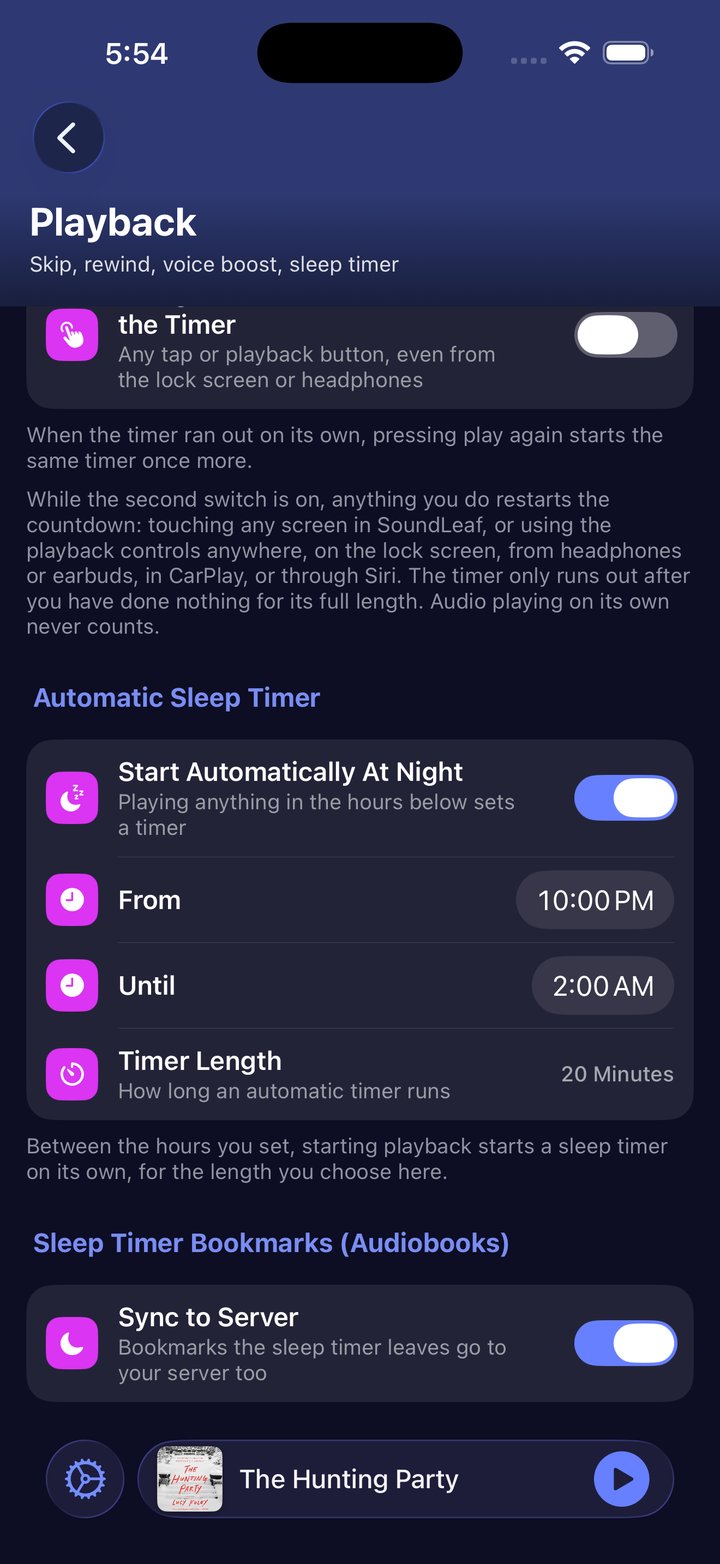
Under Settings → Playback → Automatic Sleep Timer:
- Start Automatically At Night turns it on.
- From and Until are your night hours. 22:00 to 02:00 to start with, and the window is allowed to cross midnight.
- Timer Length is how long an automatic timer runs: 5 to 120 minutes, 20 to start with.
Press play inside those hours and a timer arms itself. Outside them nothing happens, and a timer you set by hand is never replaced by an automatic one.
Waiting while you use the phone
Settings → Playback → Using SoundLeaf Restarts the Timer does what it says. While it’s on, the countdown goes back to its full length whenever you do anything: touch any screen in SoundLeaf, or use the playback controls anywhere, on the lock screen, from your headphones, in CarPlay, or through Siri.
So the timer only runs out once you’ve done nothing at all for its whole length. Audio playing by itself never counts as doing something.
Pressing play starts it again
Settings → Playback → Start Timer Again On Play covers waking up, pressing play, and drifting off a second time. When the last timer ran out on its own, the next play starts the same one again, the same duration or the same end of chapter rule.
A timer you cancelled leaves nothing behind, and an automatic night timer isn’t restarted this way. The night window arms a fresh one anyway, and a book resumed the next morning should not inherit last night’s timer.
On the lock screen
A running timer counts down on the lock screen as a Live Activity, and in the Dynamic Island on the iPhones that have one. That card carries a cancel button. Hold the island open and you also get +15 min.
Extending is not the same as choosing a duration. The added quarter hour is for now, and does not become the length the timer uses when it restarts.
If nothing appears, check Settings → SoundLeaf → Live Activities is on.
Bookmarks
On books, SoundLeaf leaves a bookmark where the timer started and another where it stopped, so you can find your way back to the last thing you remember hearing. The end of chapter timer names the chapter in its bookmarks.
Under Settings → Playback, Sleep Timer Bookmarks (Audiobooks) has a Sync to Server switch that decides whether they reach your Audiobookshelf server as well. It’s on by default.
From Shortcuts
The Shortcuts app has a Set Sleep Timer action with the minutes as a parameter. Wrap it in a shortcut, name that shortcut whatever you’d like to say, and Siri will run it. It answers “Nothing is playing right now” when there’s nothing to stop.
The other two buttons, +15 min and cancel, live on the Live Activity rather than in Shortcuts.
Troubleshooting
The timer never runs out
Using SoundLeaf Restarts the Timer is on and something is restarting it. Any tap on any SoundLeaf screen counts, and so does a playback button on the lock screen or on your headphones. Turn the switch off if you want a timer that runs down whatever you do.
The countdown is stuck
The audio is paused. The timer counts down only while something plays, and the menu says Paused with playback when that’s why.
It stopped early, or stopped without fading
An end of chapter timer stops at the chapter change, which can be sooner than you expected, and it doesn’t fade. Check whether the moon button is showing a book glyph rather than a countdown.
The night timer didn’t arm
Playback has to start inside the window. Starting a book at 21:55 and playing into the night is outside it, because the check runs when playback starts, not while it continues.
It restarted when I didn’t want it to
Turn off Start Timer Again On Play. Cancelling a timer by hand also clears the memory, so a cancel is a clean stop.